
AICKO MAIL: a free email client for Windows to tame your inbox
AICKO MAIL is an email client for Windows 10 and 11 that gathers all your accounts in one unified inbox. It is free and offers filters, blocked remote images, scheduled sending and an undo option.
For teachers and homeschooling parents who send worksheets by email, it keeps the personal address, the school address and the family address in one clear window, with a quick way to find messages that carry attachments.
Get AICKO MAIL
At a glance
- Platform : Windows 10 and 11
- Price : free
- Protocols : IMAP, POP, SMTP
- Remote images : blocked, trackers counted
- Extras : scheduled sending, undo send
Why an email client for Windows helps a teaching week
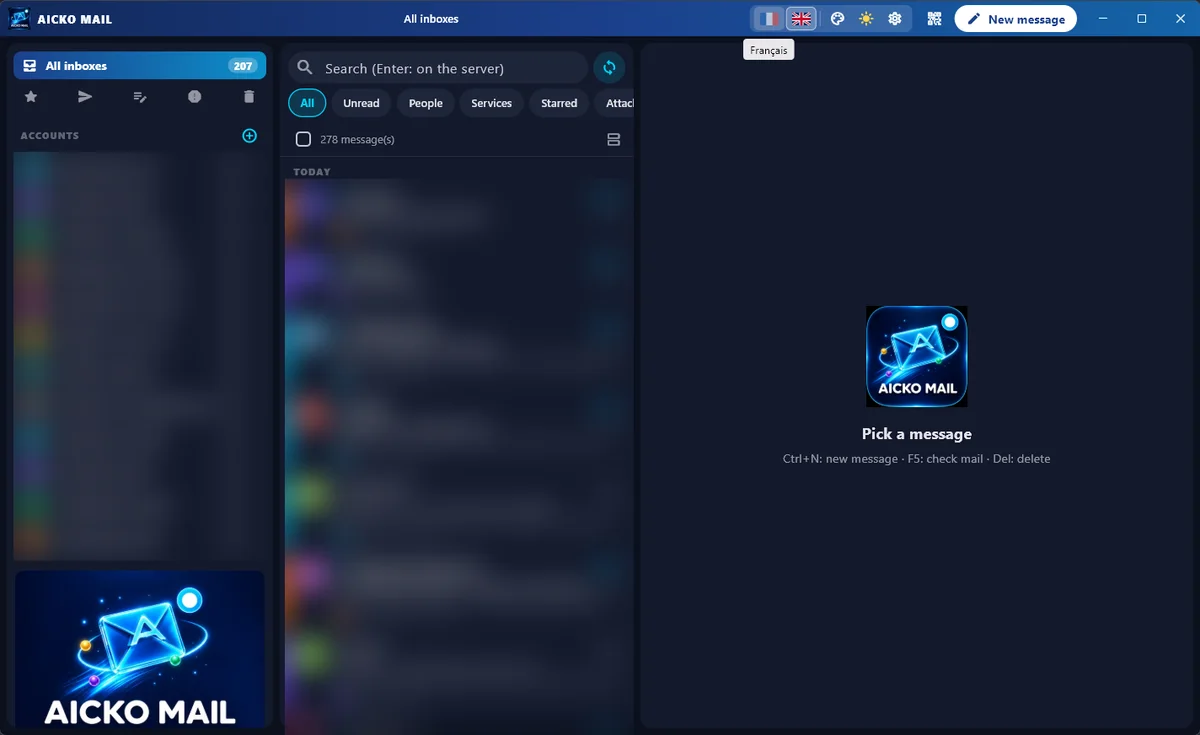
Sending worksheets, receiving finished work and answering parents quickly turns into a flood of messages. With several addresses, it is easy to miss one. A single inbox that mixes every account solves this, and then filters let you view only unread messages, people, services, favorites or messages with attachments.
Scheduled sending also helps. For example, you can write on Sunday evening, and the worksheets then reach their recipients on Monday morning.
The reading pane favours speed. You can answer from a quick reply box at the bottom of a message, and select several messages at once with Shift, Ctrl or the checkboxes. Sensitive messages are safer too, because remote images stay blocked until you decide otherwise.
What the software offers
Reading
- Three columns: folders and unified views, the message list, and the reading pane.
- Search, and filters for All, Unread, People, Services, Favorites and Attachments.
- Multiple selection with Shift, Ctrl or checkboxes.
- The software blocks remote images and shows the number of trackers it found.
- Quick reply at the bottom of the message.
Writing
- A rich text editor, with a switch to plain text or HTML.
- Send later, and cancel a message after sending it.
- An alert when you mention an attachment but forget to add it.
- For each account, a profile picture, a short name, a color and a signature that you write in the editor or paste as HTML.
Accounts, import and sync
The software connects through IMAP, POP and SMTP, and tries to detect the settings automatically. The software encrypts passwords. You can import accounts from Thunderbird or from classic Outlook, but you then retype the password. Besides, a QR code lets you sync accounts with the mobile app. The interface is in French or English, with day and night modes and eight colors.
Getting started
- Install AICKO MAIL from the Microsoft Store on Windows 10 or 11.
- Add your first account with your address and password.
- Then add the other accounts, or import them from Thunderbird or Outlook.
- Open the unified inbox and use the Attachments filter to see sent and received worksheets.
- Finally, write a message, attach the file and choose to send now or later.
Good habits
Give each account its own color and short name, so you see at a glance which address a message belongs to.
Take a minute at the start of each week to review the Unread filter and clear what you can, because a short routine keeps the inbox from growing back. If you often send the same kind of message, prepare a signature for each account so that your contact details are always correct.
Keep remote images blocked unless you trust the sender. For more details, see the AICKO MAIL page. To prepare and compress attachments first, see the AICKO PDF page.
Frequently asked questions
What is a good email client for Windows with several accounts?
AICKO MAIL is a free email client for Windows 10 and 11. It combines all your accounts into one unified inbox and offers filters, blocked remote images, scheduled sending and an undo option.
Does AICKO MAIL block tracking images?
Yes. The software blocks remote images when you read a message, and it shows how many trackers it found. You can choose to load images only for messages that you trust.
Can I move my accounts from Thunderbird or Outlook?
Yes. You can import addresses and servers from Thunderbird and from classic Outlook. For security you have to retype each password. The new Outlook and the Windows Mail app cannot be imported.
Can I sync AICKO MAIL with my phone?
Yes, through a QR code. The computer shows the code, the mobile app scans it, and both devices merge their accounts. The accounts travel in encrypted form. You install the Windows software itself from the Microsoft Store.
