
AICKO PDF: a free PDF editor for Windows, built with teachers in mind
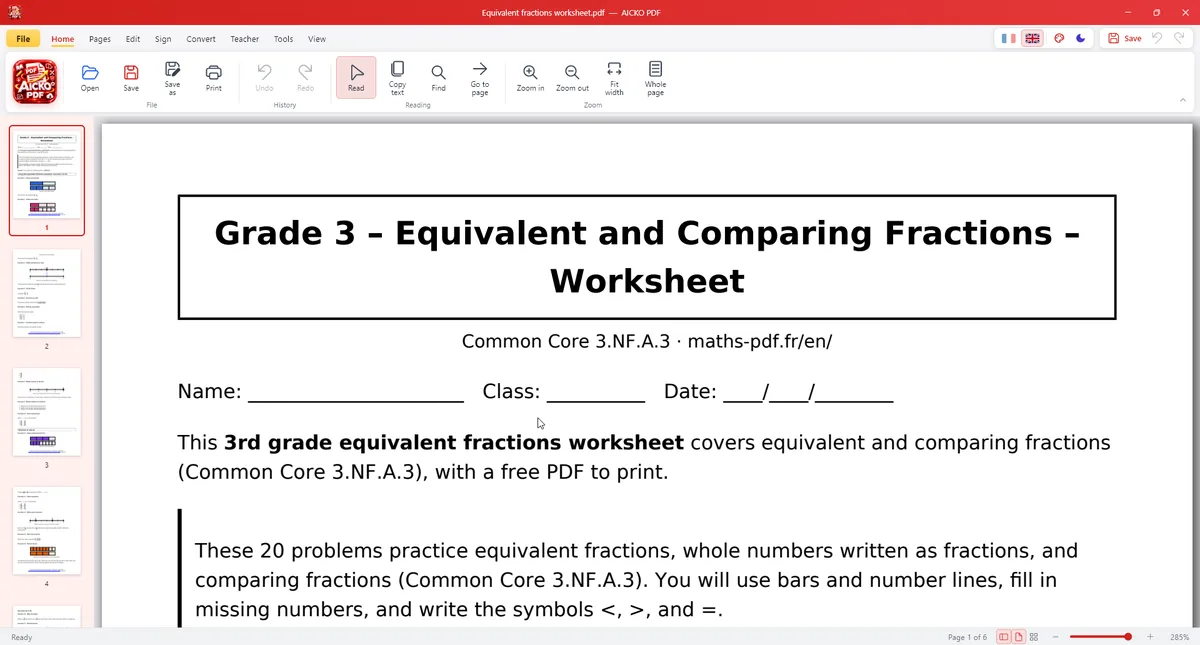
AICKO PDF is a PDF editor for Windows 10 and 11 that reads, edits, organizes, converts, compresses and signs your PDF files. It is free, needs no account and works without an internet connection.
It was designed with teachers in mind. If you print worksheets, you can correct a line, rearrange pages, split an answer key from a problem sheet and print a booklet, all from one program.
Get AICKO PDF
At a glance
- Platform : Windows 10 and 11
- Price : free
- Main tasks : edit, merge, split, sign, convert, compress
- Text recognition : Windows OCR
- Teacher tools : gap-fill sheet, booklet, DYS version
Why a PDF editor for Windows matters to worksheet users
Most printed worksheets travel as PDF files, and most contain a small fault: a wrong number, a missing page, an answer key mixed with the questions. A PDF editor for Windows lets you fix the file instead of asking its author, then print it in the right layout.
The teacher tools make the difference here. One source file can become a student sheet, a booklet and a version adapted for dyslexia in a few steps, without retyping anything.
Because the software runs offline, your files stay on the computer. That is useful when worksheets include learners’ names or marks.
Features, in detail
Editing the content
- Double-click a text to correct it; the original font, size and color are kept.
- Bold, italic, alignment and new text boxes.
- Fill in forms and have the document read aloud.
- Scanned PDFs become searchable and copyable with Windows text recognition (OCR).
Organizing and converting
- Drag and drop thumbnails; delete, rotate, duplicate, extract or insert pages.
- Merge several PDFs or split a document.
- Convert PDF to Word (.docx), PNG or JPG, and turn photos or images into PDF.
Protecting and sending
Compress a PDF, draw a signature, place a stamp, add an AES-256 password, truly redact sensitive information, and add a watermark and page numbers.
Teacher tools
Create a gap-fill sheet, separate problems from answers, make an A5 booklet, print 2 or 4 pages per sheet, or produce a version adapted to learners with dyslexia (DYS). The interface comes in French or English, with a dark mode and seven colors.
Getting started
- Install AICKO PDF from the Microsoft Store on Windows 10 or 11.
- Open a worksheet PDF from your folder.
- Correct the text, or rearrange the pages with drag and drop.
- Choose a teacher tool such as the gap-fill sheet or the booklet.
- Compress if needed, then print or share the file.
Good practice for weekly preparation
Work on a copy and keep the original. A name made of the week and the level, such as week 12 Grade 8, helps you find the right file again.
Use true redaction rather than a black rectangle when you hide personal information. The tool removes the data itself.
Compress large scans before you email them, and add page numbers to long packs, so that a learner or a parent can refer to page 7 without confusion. For files you want to protect, use the password option. Finally, check the result on screen before printing: zoom in on the edited text, look at each page thumbnail, and only then send the file to the printer.
A phone edition is described on the AICKO PDF page. For worksheets to edit, browse the Geometry (Seconde) page.
Frequently asked questions
What is the best free PDF editor for Windows?
AICKO PDF is a free PDF editor for Windows 10 and 11. It edits text while keeping the font, organizes pages, merges, compresses, signs and converts to Word, with OCR and teacher tools. It works offline.
Can I edit the text of a PDF with AICKO PDF?
Yes. Double-click a text to correct it; the original font, size and color are kept. You can also add new text boxes, apply bold or italic and change the alignment.
Can AICKO PDF convert a PDF to Word?
Yes. It converts PDF to Word (.docx), to PNG or JPG, and turns images or photos into PDF. Scanned documents can be made searchable first with the text recognition (OCR) of Windows.
Is AICKO PDF free and safe for private files?
It is free, needs no account and works without an internet connection, so files stay on your computer. It also lets you add an AES-256 password and redact sensitive information for real.
