
AICKO PLAYER: a free video player for Windows, for music too
AICKO PLAYER is a video player for Windows 10 and 11 that also plays music. It supports playlists, subtitles, playback speed and resuming a file where you stopped, and it is free.
Teachers and homeschooling families who use videos beside their printed worksheets will find it handy: slow a demonstration down, turn subtitles on, jump back to the same minute the next day, and take a screenshot of a frame.

Get AICKO PLAYER
At a glance
- Platform : Windows 10 and 11
- Price : free
- Media : video and music
- Extras : playlists, subtitles, speed, resume
- Screenshot : one click
Why a video player for Windows helps a lesson routine
A short video often explains a point better than a paragraph. But the player matters: a file that will not open, subtitles that are not found, or a video that restarts from zero can waste a lesson.
AICKO PLAYER solves these small problems. It uses a playback engine based on libmpv and FFmpeg, which reads very many formats, and a file you choose by hand is always attempted.
In class, this means fewer surprises. You can open a lesson recording, a song for a language session or a short demonstration, and the same window handles all three, with the same controls each time.
Features in detail
Playback
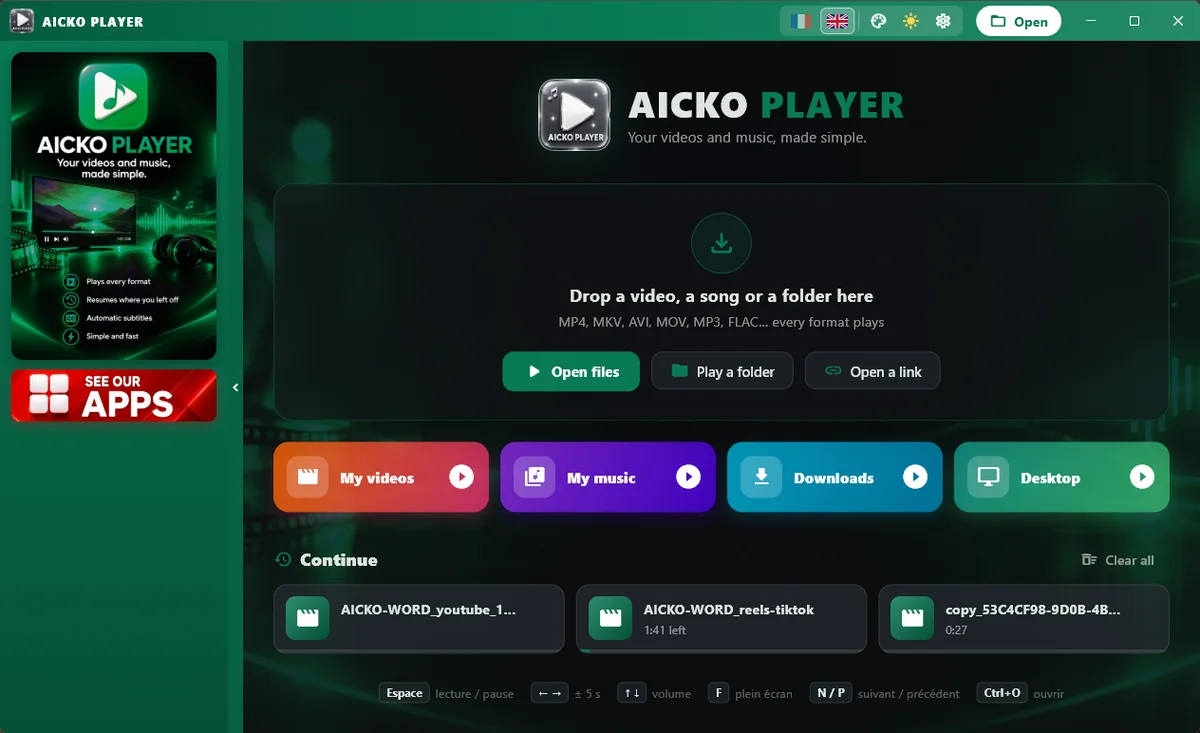
- Queue and playlists, with shuffle, repeat and drag-and-drop ordering.
- Resume playback where you stopped, remembered file by file.
- Speed control, fullscreen and an always-on-top window.
- Fit, fill or stretch the picture to your screen.
- Open a link or a stream as well as a file.
Subtitles and audio
Subtitles that sit next to the video are found automatically, and a menu lets you choose among tracks. The same goes for the audio language, which is useful for a lesson recorded with several versions.
Controls and capture
- Click to pause, double-click for fullscreen, mouse wheel for volume.
- Keyboard shortcuts for the usual actions.
- A screenshot button that saves a frame in your Pictures folder.
- Quick access to Videos, Music, Downloads and Desktop.
Settings
The interface is in French or English, with a dark or light theme and eight colors.
Getting started
- Install AICKO PLAYER from the Microsoft Store on Windows 10 or 11.
- Open a video or a music file, or drag several files into the window.
- Check that the subtitles and the audio track are the ones you want.
- Adjust the speed if the explanation is too fast.
- Close the file whenever you like; next time it resumes at the same point.
Good habits in class and at home
Prepare a playlist before the lesson, in the order you will use the videos. It avoids searching in folders while learners wait.
Name your files in a way that sorts well, with a number at the start, so the playlist follows your teaching order without extra effort.
Pause often and ask a question. A video is most useful when it is followed by a worksheet, so keep the printed page ready.
Finally, check the sound before learners arrive, and set the volume with the mouse wheel. Quiet preparation avoids losing the first minutes of a lesson.
Use the screenshot button to capture a key image, then add it to your handout. To assemble the handout, see the AICKO WORD page or the Geometry (Seconde) page for worksheets to match your videos.
Frequently asked questions
What is a good free video player for Windows?
AICKO PLAYER is a free video and music player for Windows 10 and 11. It reads very many formats, supports playlists and subtitles, controls speed and resumes playback where you stopped.
Does AICKO PLAYER find subtitles automatically?
Yes. Subtitles stored next to the video are detected automatically, and a menu lets you switch between subtitle tracks and audio languages when the file contains several.
Can I slow down a video in AICKO PLAYER?
Yes. You can change the playback speed, use fullscreen or keep the window always on top. A screenshot button also saves the current frame as an image in your Pictures folder.
Can AICKO PLAYER play music and streams?
Yes. It plays music files as well as videos, and you can open a link or a stream. Your language, theme and color are set in the settings, in French or English.
